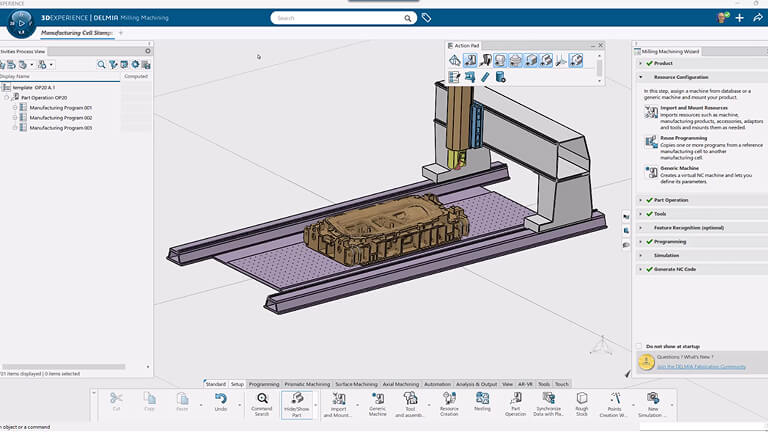
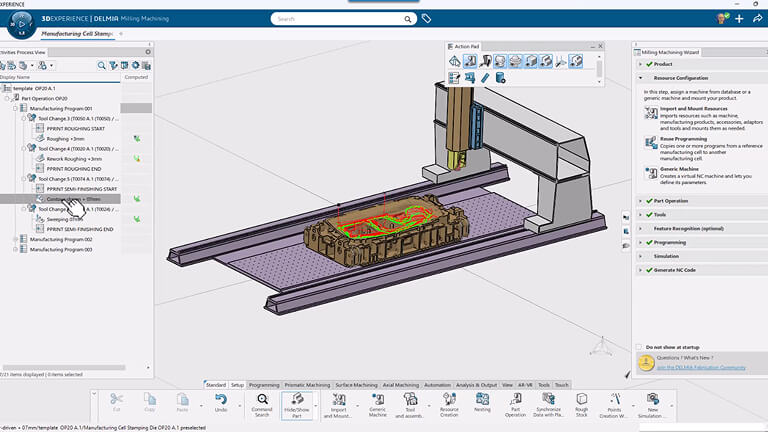
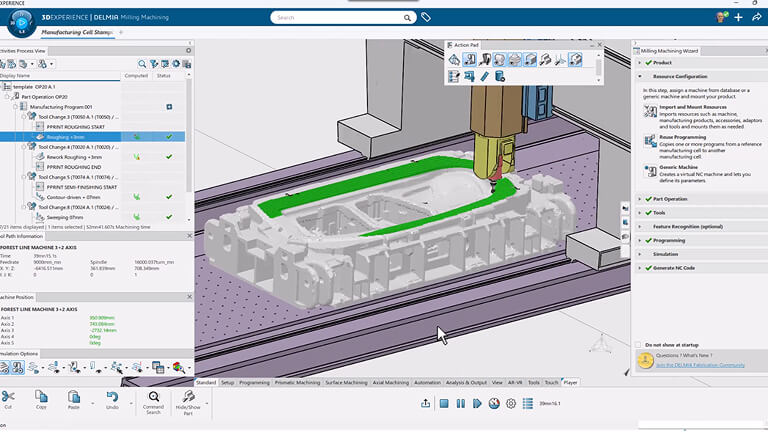
DELMIA Milling immerses users in a realistic 3D environment. A toolpath creation wizard and context-based menus are available to help do a quick 3D setup and create the NC toolpath. If a user clicks on a Help icon while editing a parameter, an image describing the parameter pops up in the panel. Users can quickly organize programs in the activities process tree using copy and paste functions. Tool changes and machine rotations are automatically generated and can be visualised in the activity process tree.
DELMIA Milling lets users manage CNC machines, accessories, tools and tool assemblies. These resources can be retrieved through standard search capabilities, using relevant machining attributes, and instantiated in a manufacturing cell. Users can clearly see the impact of changes on the definition of objects such as parts or cutting tools across all NC processes and programs. DELMIA Milling supports default or customised representations of the cutter and tool assemblies that are used for verification, simulation with material removal, and collision checking.
DELMIA Milling offers a broad range of machining operations for toolpath definition, including pocketing, facing and contouring. These operations can be defined as multi-level and multi-pass. The tool path can be optimised for high-speed or point-to-point machining and for a full set of axial operations from standard drilling to complex boring and chamfering. DELMIA Milling offers unique functionalities for creating and verifying milling, drilling, and probing operations. Probing operations are very flexible and can be customised with associated user parameters. DELMIA Milling extends the 2.5-axis capabilities by offering a best-in-class 4-axis pocketing operation that includes a variety of strategies, island management and user-defined lead angle on the tool axis for better cutting conditions. This operation also supports non-cylindrical and non-conical surfaces and revolution surfaces going beyond 180 degrees.
DELMIA Milling offers a full set of high-end strategies from roughing to finishing, such as sweeping, Z-Level, contour-driven machining, and curve machining. It automatically generates tool paths for the entire part. Users can also author operations needed for machine-specific features. High-speed milling features and specific pattern operations for hard-material machining, such as concentric, trochoid, and helix 3D, are included. The concentric strategy controls the radial engagement to maximise the efficiency of the machine while protecting the cutter. With this powerful combination, users can drive program generation to shape a proven-quality tool path and get the best possible machine usage.
Users can select a roughing strategy—such as back-and-forth, helical, concentric or part-offset—based on the material being machined and the shape of the part. DELMIA Milling takes tool assemblies into account during computation to generate a collision-free tool path. As roughing operations are defined, the in-process part is computed and used as the starting point for the next set of operations. Users can then create a new roughing operation with a smaller diameter tool. This tool path is automatically generated based on material that remains from any previous operation, including roughing.
DELMIA Milling lets users identify potential machine-tool kinematic issues during toolpath computation and automatically correct the tool path when errors are found. Kinematic-related errors, such as axis out-of-limit and singularity issues that are normally discovered downstream during machine-tool simulation or physical test runs, are now found and solved at the earliest possible point in the business process—during toolpath computation–resulting in huge productivity gains.
Adjusting parameters in the machining operation, fine-tuning the approach/retract macro, and optimising path sequencing are achieved almost instantaneously in NMD with this unique technology. Built on the 3DEXPERIENCE® platform, DELMIA Milling offers complete associativity with design tools, product engineering, manufacturing processes, and resources. Users are automatically alerted to product design changes and can quickly assess their impact on the machining process. They can easily update the toolpath program.
DELMIA Milling allows users to simulate, validate, and program wire Electrical Discharge Machining (EDM) processes. Users can compute the wire EDM path and program the synchronisation of each end of the wire to the part contours. Users can implement 2 and 4-axis programming capabilities with dedicated wire EDM strategies, and visualise and validate their program strategy, and then produce the machine code to be used in the real machine. As with all DELMIA Machining applications, users can save and reuse best practices by creating the wire EDM paths, storing them in a template, and then reusing the same strategy on other parts to be machined.
DELMIA Milling has powerful simulation capabilities for toolpath validation. This simulation functionality brings one of the most advanced machine simulation modules to the market to identify potential issues earlier in the process. DELMIA Milling can detect near misses, which are the user-defined safety distance and multiple tool change locations are supported for a more accurate simulation of the machine motions. The simulation context, saved in the 3DEXPERIENCE platform, allows the user to organise their review in the most convenient way for them, and it also ensures traceability of the validation task. It allows users to program, optimise and validate the machining most efficiently. It lets NC Programmers identify toolpath errors earlier in the process and shortens programming time.
DELMIA Milling offers seamless generation of APT source and NC Code ISO format through the integrated post-processor execution engine, the library of standard post-processor syntax mapping tables and Post Processor samples. The output formats can easily be customised. The output is generated and managed in the 3DEXPERIENCE® platform. Additional files generated by the post-processor are also automatically saved, so all relevant outputs for any part are current and available at the same location. Key information can be exported as documentation for ready reference on the shop floor.
DELMIA Milling makes NC Programmers more efficient with features like intuitive graphic dialogue boxes, traffic light indicators for undefined machining parameters, and a help icon for each parameter. When NC programs are authored or edited, DELMIA Milling takes into account the machine tool kinematic definition if embedded in the manufacturing cell. Tool changes and machine rotations are automatically generated and can be visualised in the machining operation definition panel.
DELMIA Milling’s wide range of operations and strategies helps programmers create toolpaths that minimise non-value-added motion, optimised NC programs, including high-speed machining features and reduce overall machining cycle time. DELMIA Milling takes in-process parts into account to generate collision-free tool paths. The 3-to-5 converter option provides the best of both worlds: high-speed milling wherever the initial constant tool axis can be held, and high-quality machining without tool change with 5-axis motion locally.
DELMIA Milling improves automation and standardisation of NC toolpath programs. Users can define and store machining processes for multi-pocket operations as dedicated templates and store them in catalogues for reuse. Enterprise IP is capitalised and recycled to make programming more efficient. The gains in productivity and machining-work standardisation are significant.
Based on the 3DEXPERIENCE® platform, DELMIA Milling provides an unrivalled level of associativity between product engineering, manufacturing processes, and resources. Companies can manage concurrent engineering and manufacturing flows more effectively and shorten the design-to-manufacturing cycle. DELMIA Milling offers industry-best support of design changes and design variants and the rapid creation of programs for families of parts. Native implementation links connect machining programs to engineering and manufacturing data, for cutters, for example. These links can be used to see which machining programs are impacted by engineering or manufacturing changes, ensuring that machining data is up-to-date with engineering changes.